1. Introduction
These Terms & Conditions govern your use of FileOrbit by orbytrix. By using the app you accept these terms. If you disagree, do not use the app.
Welcome to FileOrbit — these terms explain your rights and responsibilities when using our app and services.
These Terms & Conditions govern your use of FileOrbit by orbytrix. By using the app you accept these terms. If you disagree, do not use the app.
orbytrix grants you a limited, personal, non-exclusive, non-transferable license to use FileOrbit on Apple devices you own or control. You must not redistribute, sublicense, reverse-engineer, or attempt to extract source code unless expressly permitted by law.
FileOrbit may offer subscription-based premium features. Subscriptions are processed via Apple’s in-app purchases — Apple manages billing, renewals, refunds, and subscription cancellation. Your subscription will auto-renew unless cancelled through Apple.
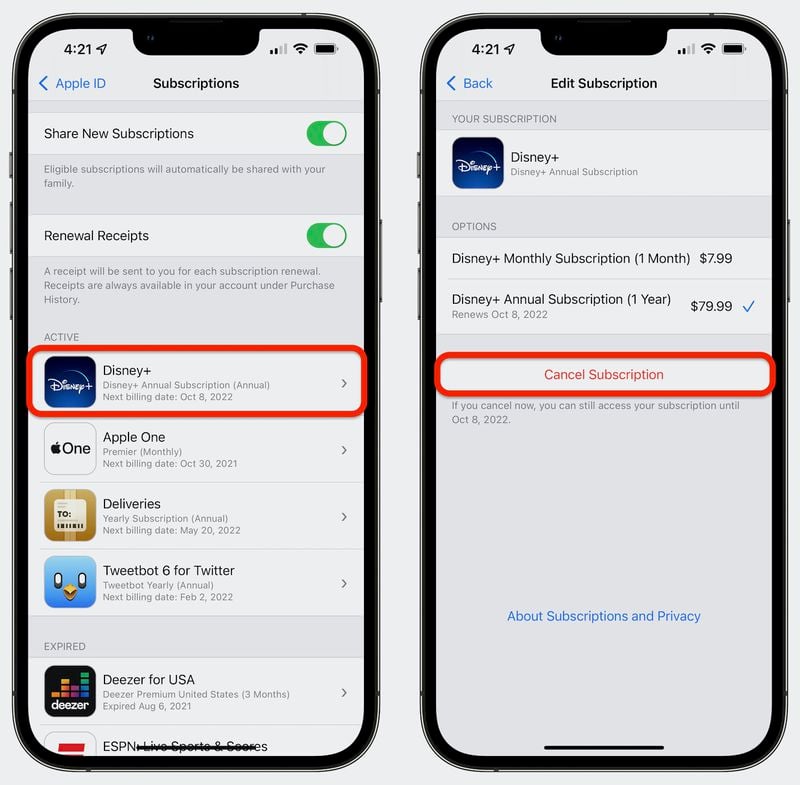
Subscriptions are managed by Apple. Follow these simple steps to cancel your subscription on iPhone or iPad. The screenshots below demonstrate the process.
Open the Settings app on your iPhone or iPad.
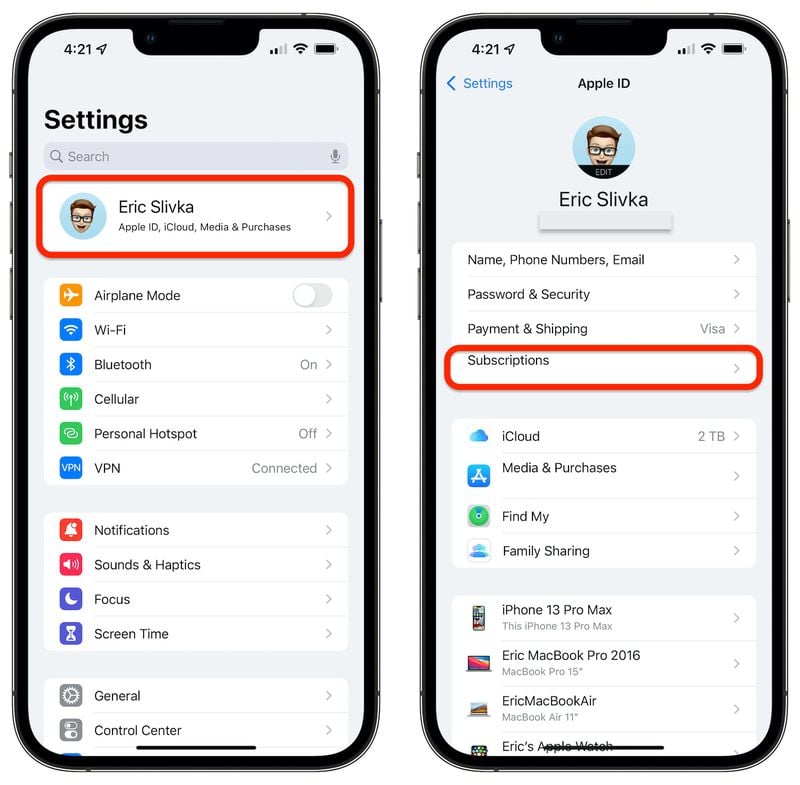
Tap your name or Apple ID banner at the top of the Settings screen.
Select Subscriptions to view your active subscriptions.

Tap on FileOrbit in your active subscriptions list.

Tap Cancel Subscription at the bottom and confirm your cancellation.

Note: Cancelling will usually retain access until the end of the current billing period. If you don’t see the subscription, it may have been purchased with a different Apple ID.
All refunds and purchase disputes are handled by Apple. Please contact Apple Support for refund requests or payment inquiries.
You must not use FileOrbit to store, share, or manage unlawful, infringing, or offensive content. orbytrix reserves the right to suspend or terminate access for violations of these Terms.
orbytrix may update these Terms and the app. Significant changes will be posted here; continued use implies acceptance.
FileOrbit is provided "as is." To the maximum extent permitted by law, orbytrix disclaims all implied warranties and will not be liable for indirect or consequential damages arising from the app’s use.
These Terms are governed by the laws of the jurisdiction where orbytrix is registered. Insert your company’s legal jurisdiction here if needed.
Questions about these Terms? Reach us at:
Email: fileorbit.tester1@gmail.com
Company: orbytrix